
Custom Fonts
Using custom fonts in your Cascade project
How do I add custom fonts to my Cascade project?
There are two ways of including custom typefaces in your Cascade project.
- If the typeface is hosted by a third-party, you can link to that font file by using the code below:
- If you have a font file on your computer that you would like to use, you can add them by following the steps below:
Adding the font files to your Cascade project
Custom font files should be placed within their own folder, and then added to the assets folder in your Cascade project.
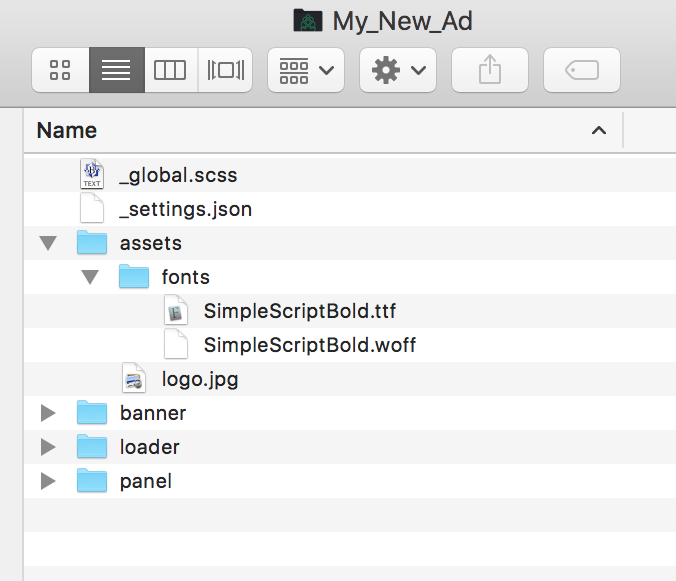
Font files should be placed within the assets folder of your project.
Including custom fonts in the Cascade style sheet
Use the code sample below as a guide to adding custom fonts to your index.scss file within your Cascade project.
@font-face {
	font-family: 'SimpleScriptBold';
	src:url('/assets/fonts/SimpleScriptBold.woff') format('woff'),
		url('/assets/fonts/SimpleScriptBold.ttf')  format('truetype');
}
What font formats are supported by Cascade?
| Font Format | Cascade Support | Notes |
|---|---|---|
| OpenType (.otf) | Fully supported | http://caniuse.com/#search=OTF |
| TrueType (.ttf) | Fully supported | |
| Web Open Font Format (.woff) | Fully supported | |
| Embedded OpenType Font (.otf) | Partially supported | |
| SVG font (.svg) | Not supported | Browser support for SVG fonts is being phased out. We recommend another format such as OTF, TTF, or WOFF. |
Should I use OTF or TTF?
Both OpenType and TrueType fonts are equally supported by most current browsers and devices. If you have a font in both formats, we recommend you chose the file with the smaller file size to help your ad to load quickly. It is NOT advised to include both OTF and TTF formats in your Cascade project.
Updated less than a minute ago